"Blocked from accessing graphics hardware": driver, timeout or hardware?
Windows shows "Application has been blocked from accessing graphics hardware" and the game closes. What TDR is (the GPU takes more than 2 seconds to respond), how to tell driver from hardware, a clean install with DDU and how to raise TdrDelay carefully.
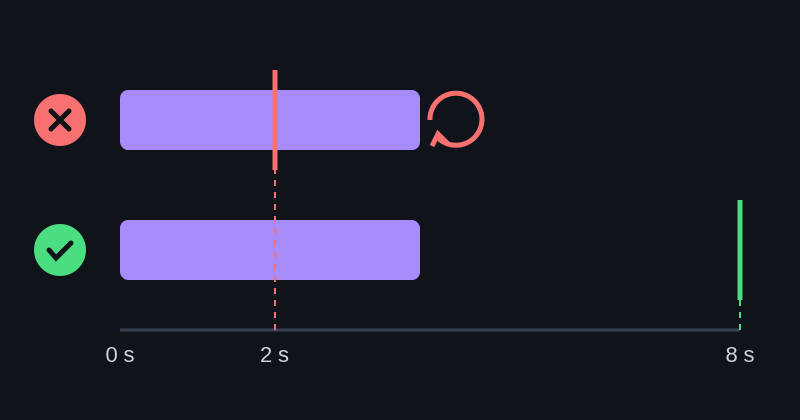
The message means the GPU took more than 2 seconds to respond and Windows reset it. Start with a clean driver install using DDU. If it persists, remove any overclock and watch temperatures. Raising TdrDelay to 8 seconds in the registry helps in specific cases, but won't fix failing hardware.
What exactly happens: the 2-second clock
Windows watches the GPU with a system called TDR. If the GPU stays "busy" for more than 2 seconds without answering, Windows assumes it has hung, resets it and blocks the app using it. That's why the screen goes black for a moment before the warning.
Driver or hardware? Look at when it happens
| If it happens… | It's probably | Start with |
|---|---|---|
| Right after updating the driver or Windows | Driver | Step 1 |
| Only in one specific game or program | Driver or that game's settings | Steps 1 and 2 |
| In every game, after playing a while | Temperature or overclock | Step 3 |
| Under heavy load, sometimes with the PC shutting off | Power supply | Step 3 |
| With a VIDEO_TDR_FAILURE blue screen | Same problem, more serious | VIDEO_TDR_FAILURE guide |
Step 1: clean driver with DDU
- Download the latest driver from NVIDIA, AMD or Intel, and DDU (Display Driver Uninstaller).
- Disconnect from the internet so Windows doesn't install its own driver.
- Restart into safe mode, open DDU, pick your brand and click Clean and restart.
- Install the downloaded driver and reconnect.
If the problem started with the new driver, do the same but install the previous version.
Step 2: raise the timeout (TdrDelay)
Edit the registry carefully and create a restore point first. This gives the GPU more time, but if the hardware is failing it only delays the problem.
- Press Windows + R, type
regeditand go toHKEY_LOCAL_MACHINE\SYSTEM\CurrentControlSet\Control\GraphicsDrivers. - Right-click the right pane → New → DWORD (32-bit) Value → name it
TdrDelay. - Double-click, base Decimal, value 8. Restart.
To undo, delete TdrDelay and restart. It mainly helps with render, AI or editing apps that send very long jobs to the GPU.
Step 3: the hardware side
- Remove overclocks in MSI Afterburner or AMD's panel (Reset). Factory "OC" cards can fail too: drop the clock by 50–100 MHz to test.
- Temperature: above 85 °C, clean out dust and check airflow. See high temperatures.
- Power supply: a weak or old PSU causes voltage drops at load spikes. If the PC also shuts off suddenly, suspect it.
- Test in another PC if you can: if the GPU fails there too, it's the GPU.
If it only happens in Warzone or Call of Duty with code 6068, there's a dedicated guide: Dev Error 6068.
Frequently asked questions
Can I turn TDR off entirely?
You can, but shouldn't: if the GPU hangs, the PC will freeze and you'll have to restart it by hand. Raising the timeout is better.
Does this mean my GPU is broken?
Not necessarily. Most of the time it's the driver or heat. Only if it fails with a clean driver, no overclock, good temperatures and in another PC is it the card.
Does it happen with integrated graphics?
Yes, especially on laptops. Update the Intel or AMD driver from their website and, if you have two GPUs, assign the game to the dedicated one.
If you can't tell whether it's driver or hardware, tell us your GPU and when the message appears via the contact page.
Still not fixed?
Email us at glitchfixesp@gmail.com with your device model, the exact error message and what you have already tried from this guide. We reply personally (in English or Spanish) and, if the issue keeps coming up, we add the new fix to the guide.