CS2 stutter or lag: FPS or network, and the settings that fix it
Counter-Strike 2 stutters, rubber-bands or you die behind walls? Turn on telemetry to see whether it's your PC (FPS) or your connection (ping and packet loss), plus the settings that actually help each case.
Turn on telemetry in Settings → Game to see FPS, ping and packet loss. If FPS drops: update the driver, enable NVIDIA Reflex, lower particles and ambient occlusion, and remove old CS:GO launch options. If there's packet loss: play on cable and set the packet loss buffer to 1.
First: FPS or network?
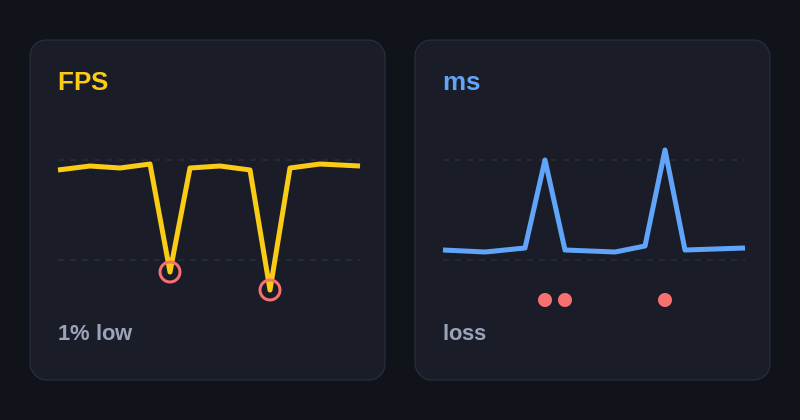
A stutter from an FPS drop and a "teleport" from packet loss look alike, but the fixes are completely different. The game tells you which one it is:
- Go to Settings → Game → Telemetry.
- Turn on showing FPS, ping and packet loss (incoming and outgoing).
- Play a match and watch which number changes right when you feel the stutter.
| What you see in telemetry | What's happening | Go to |
|---|---|---|
| FPS suddenly drops (say from 200 to 60) in smokes, molotovs or firefights | Your PC can't keep up in those moments | "If FPS drops" |
| Packet loss shows up or ping jumps | Your connection | "If there's packet loss" |
| High, stable FPS, network fine, but it doesn't feel smooth | Monitor at 60 Hz or Windows settings | "If everything looks fine but it isn't smooth" |
If FPS drops
In Settings → Video → Advanced Video:
| Setting | Recommended | Why |
|---|---|---|
| NVIDIA Reflex | Enabled (+ Boost if your CPU is tight) | Cuts the delay between your click and the shot |
| Particle detail | Low | Smokes and molotovs are where FPS drops most |
| Ambient occlusion | Disabled | Costly and adds nothing for competitive play |
| Shadow quality | Medium, or high if your PC can handle it | Shadows let you see enemies peeking |
| Anti-aliasing | MSAA 2x or 4x (CMAA2 if tight) | 8x costs a lot with no real advantage |
| FidelityFX Super Resolution | Disabled | Blurs the image and makes distant heads harder to see |
| Display mode | Fullscreen | Less delay than borderless window |
Also:
- Update the graphics driver. Improvements often arrive alongside CS2 updates.
- Remove CS:GO launch options: in Steam, right-click CS2 → Properties → General → Launch Options. Delete things like
-tickrate 128,-threadsor+cl_interp: CS2 ignores them or they cause trouble. - Close browsers and programs that record or draw over the game while you play.
If there's packet loss
CS2 uses the "subtick" system, which relies heavily on your connection not losing data. If you lose packets, you'll see "teleports" and die behind walls:
- Play on cable. It fixes the most. Wi-Fi and powerline adapters lose packets easily.
- In Settings → Game, find Buffering to smooth over packet loss and set it to 1 packet. It adds a tiny delay but removes the jumps.
- Pause downloads (Steam, Windows Update) and ask people at home not to stream 4K while you play.
- If you lose packets even on cable with nothing else connected, the problem is your ISP: call them and explain it.
If everything looks fine but it isn't smooth
- Check the monitor is at its max refresh rate: Settings → Display → Advanced display → Refresh rate. After some updates it silently goes back to 60 Hz.
- Turn on Windows Game Mode and, if your graphics card supports it, Hardware-accelerated GPU scheduling (Settings → Display → Graphics).
- On laptops, plug in the charger and choose the best performance power mode.
Frequently asked questions
Which launch options work in CS2?
Very few. The safest is to leave them empty. Most commands used in CS:GO no longer work.
Why do I have high FPS and it still stutters?
Because the "1% low" matters, meaning the occasional drops. If you go from 300 FPS to 80 in a smoke, you feel it even if the average is high. Lower particles and check the monitor.
Does subtick cause the teleporting?
Not directly. Jumps are usually packet loss or ping spikes. Check telemetry: if you see loss, the problem is your connection.
If you're not sure how to read your telemetry, send us a screenshot taken during the stutter via the contact page.
Still not fixed?
Email us at glitchfixesp@gmail.com with your device model, the exact error message and what you have already tried from this guide. We reply personally (in English or Spanish) and, if the issue keeps coming up, we add the new fix to the guide.