Fortnite matchmaking error: how to find matches again
Fortnite showing a matchmaking error, stuck on "Finding match" or cancelling at the start? The solo vs party test, the lowest-ping region, version mismatches, anti-cheat and console cache.
First check for an outage or ongoing update (status.epicgames.com). Then try matchmaking on your own: if that works, the party is the problem (let someone else lead and make sure everyone has the same version). If solo fails too, set the matchmaking region to the lowest ping, restart the router and, on PC, repair Easy Anti-Cheat.
The test: solo or party
Before changing anything, leave the party and search for a match on your own in a busy mode (for example solo Battle Royale). The result tells you where to look:
| Result | Where the problem is | Go to |
|---|---|---|
| Solo works, party fails | The party: leader, version or cross-platform | "If it only fails in a party" |
| Solo fails too | Region, network or game files | "Matchmaking region" |
| It fails for everyone at once | Epic's servers (new season, event, maintenance) | All you can do is wait |
| The error mentions anti-cheat or the game closes | Easy Anti-Cheat (PC only) | "Easy Anti-Cheat" |
Whatever number appears with the message (for example "#1"), the fixes are the same.
If it only fails in a party
Party matchmaking depends on the leader: their region, game version and connection are used. If the leader has a problem, the whole party can't find a match.
- Change leader. Everyone leaves the party and another player creates it, ideally the one with the best connection.
- Same version. If anyone is missing the latest update, the party can't matchmake. Everyone should close and reopen the game so the patch downloads.
- Cross-platform. If you're on different consoles, everyone needs cross-platform play turned on in Fortnite settings.
- Parental controls. If someone's account has age restrictions, it may block chat or playing with strangers and cause party errors.
Matchmaking region
On "Auto", Fortnite sometimes sends you to a busy or distant server. Setting the lowest-ping region usually brings matchmaking back:
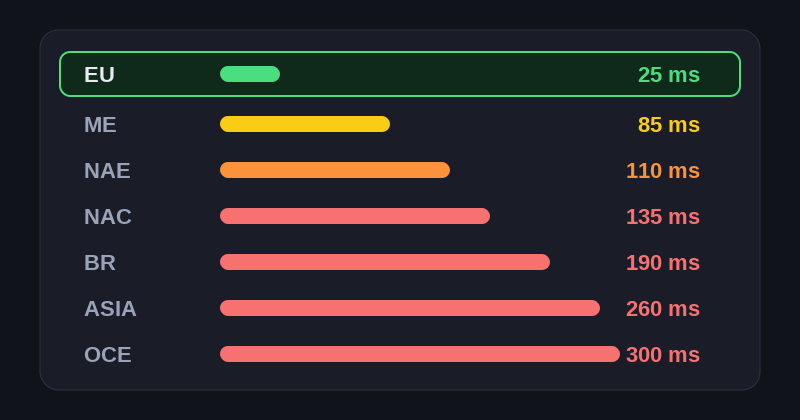
- In the lobby, open the menu and go to Settings (the cog).
- On the Game tab, find Matchmaking Region.
- Change "Auto" to the region with the lowest ping (the number appears next to each one).
- Apply and search again.
Modes with few players (some creative or past-season modes) take a long time to fill, especially late at night. If it only fails in one mode, try another.
Your network and the cache

- Restart the router: turn it off for 1 minute. If you're on Wi-Fi, try a cable.
- Turn off your VPN or any "ping booster".
- On PC: open Command Prompt as administrator and run
ipconfig /flushdns. Restart the PC. - On PS5, Xbox and Switch: turn the console off completely (not rest mode) and unplug it for 2 minutes. That clears the cache.
- Strict NAT: if your console shows NAT Type 3 or Strict, party matchmaking fails far more. Follow our strict NAT guide.
Easy Anti-Cheat (PC only)
Fortnite on PC uses Easy Anti-Cheat. If it's damaged, the game won't let you into matches:
- Go to the game folder, usually
C:\Program Files\Epic Games\Fortnite\FortniteGame\Binaries\Win64\EasyAntiCheat. - Run EasyAntiCheat_EOS_Setup.exe as administrator and click Repair Service.
- In the Epic launcher library, click the three dots on Fortnite → Manage → Verify.
- Restart the PC before playing again.
Frequently asked questions
Why does it only fail when I play with friends?
Because matchmaking depends on the party leader: their region, version and connection. Try having another player create the party.
Can a pending update cause this error?
Yes. With an update not installed you can't matchmake. Restart the launcher or console to force the download.
Does changing DNS help?
It can help if you can't log in, but it doesn't improve ping or make matchmaking faster.
If you still can't find matches, tell us whether it fails solo or in a party and which platform you play on via the contact page.
Still not fixed?
Email us at glitchfixesp@gmail.com with your device model, the exact error message and what you have already tried from this guide. We reply personally (in English or Spanish) and, if the issue keeps coming up, we add the new fix to the guide.