Fall Guys stuck connecting or won't reach the server: fix on PC and console
Fall Guys stuck on "Connecting to server", failing to log in or kicking you mid-round? How to tell whether it's your Epic account, your network or the servers, on PC, PlayStation, Xbox and Switch.
First check whether Epic's servers have problems (status.epicgames.com). If they're fine, the fault is almost always your Epic account: sign in again, check it's linked to your console and that it has no parental-control restrictions. On PC, also sync the Windows clock and verify the game files.
The 4 points Fall Guys goes through
Before you reach the title screen, Fall Guys has to get through four places. If one fails, you get stuck on "Connecting" or see an error. The one that fails most isn't your internet, but the third: your Epic account.
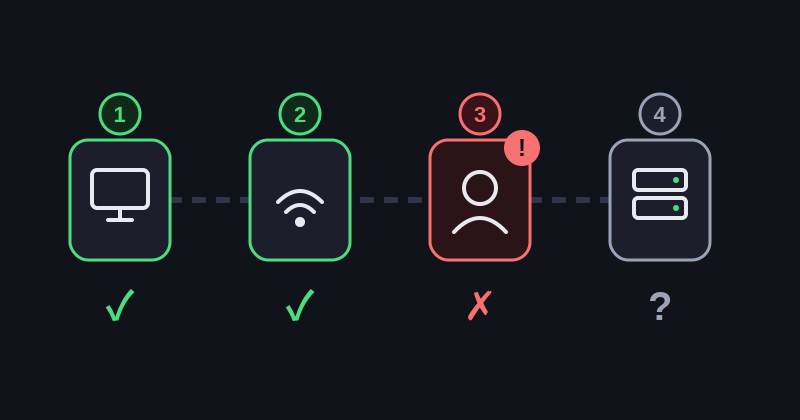
| What happens | Failing point | Go to |
|---|---|---|
| It happens to all your friends at once, or right after an update | 4. Servers | "Check the servers" |
| Stuck on "Connecting" or "Login failed" on the title screen | 3. Epic account | "Fix the Epic account" |
| Only happens on PC and other apps work | 1. Your PC (clock, files) | "On PC" |
| You get in, but get kicked mid-round | 2. Your network | "If it kicks you from the match" |
Check the servers
Go to status.epicgames.com and look for "Fall Guys" and "Epic Online Services". If either is orange or red, it's not your problem: wait. On new season days, queues or outages in the first hours are very normal.
Fix the Epic account
Fall Guys uses your Epic account on every platform to store your crowns and outfits and to play with people on other consoles. If the account has any problem, the game won't get past the title screen.
- Sign out and back in. In the game, under Settings → Account. On console, fully closing and reopening the game usually forces a new sign-in.
- Check the link. On your phone, go to epicgames.com, open Account → Apps and Accounts and check your PlayStation, Xbox or Nintendo account is connected. If you linked the wrong Epic account, you can disconnect it there.
- Epic parental controls. Accounts for under-13s (or your country's minimum age) have limited features until a parent gives permission. If the game won't let you in or play with friends, check the account's email: it may be waiting for that permission.
- Accept new terms. Sometimes Epic asks you to accept a new version of the agreement and the game just waits. Sign in on Epic's website and accept what it asks.
On PC
- Windows clock. If the PC's clock is off, the servers reject the connection for security. Right-click the clock → Adjust date and time, turn on "Set time automatically" and click Sync now.
- Game files. In the Epic launcher library, click the three dots on Fall Guys → Manage → Verify. On Steam: right-click → Properties → Installed Files → Verify integrity.
- Epic Online Services. In Settings → Apps, check "Epic Online Services" is listed. If not, open the Epic launcher and it will ask to install it.
- VPN and antivirus. Turn off any VPN and try allowing Fall Guys through your antivirus firewall.
On PlayStation, Xbox and Switch
- Turn the console off completely (not rest mode), turn the router off for 1 minute and try again.
- Check the console and the game are up to date.
- On Switch, make sure there's free space: if the game update couldn't install, it stays on "Connecting".
- Check the NAT type in the console's network settings. With Type 3 or strict NAT you can get in, but party play fails.
If it kicks you from the match
If you get in fine but get disconnected mid-round, it's a drop in your connection lasting a few seconds:
- Play on a cable or, if you can't, on 5 GHz Wi-Fi close to the router.
- Pause downloads and streaming in the rest of the house while you play.
- If you party with friends on other consoles, everyone needs cross-platform play turned on in Fall Guys settings.
Frequently asked questions
Do I need an Epic account to play Fall Guys?
Yes. Since the game went free, every platform uses an Epic account to save your progress and play online. On console you can create or link it from the game itself.
Will I lose my crowns if I link another Epic account?
Progress goes with the Epic account. If you link a different one, you'll see that account's progress. Make sure which one it is before changing it.
Does reinstalling the game fix it?
Almost never, because connection failures are usually the account or the network. Before reinstalling, verify the files, which is faster.
If you still can't get in, tell us your platform and the message on the title screen via the contact page.
Still not fixed?
Email us at glitchfixesp@gmail.com with your device model, the exact error message and what you have already tried from this guide. We reply personally (in English or Spanish) and, if the issue keeps coming up, we add the new fix to the guide.